



Posts on this page:
- Database log files are not truncated when you perform a full Certification Authority database backup.
- Install Certification Authority with PowerShell
- Web Enrollment pages fails after MS11-051 patch installation
- CA certificates and Untrusted Certificates container
- How to change CA certificate validity period
SYMPTOMS
Consider the following scenario. You have Windows Server 2008 R2 with installed Active Directory Certification Authority role. When you perform a full database backup by using either certutil.exe utility, or Certification Authority, the database log files are not truncated, as expected and backup set may contain up to 60 database log files. When using certutil.exe tool, it reports that log files are successfully truncated:
Backing up Database files: 100%
Backing up Log files: 100%
Truncating Logs: 100%
Backed up database to C:\Backup.
Database logs successfully truncated.
CertUtil: -backupDB command completed successfully.
Read more →
Hi there! PowerShell Crypto Guy is again here!
Today I've finished SetupCA.ps1 script testing and I'm ready to share it with you. Of course this is not the first attempt to install CA role from cmdline, there is already SetupCA.vbs script written by Windows PKI team. To be honest, this is not the first PowerShell script for CA installation from cmdline. The first attempt was made by Hasain Alshakarti — http://secadmins.com/?dl_id=3. However this script just illustrates basic API functionality with ability to specify CA name, CA certificate validity and CA type. There is no error handling at all, even whether the CA can be installed on the computer.
Read more →
SYMPTOMS
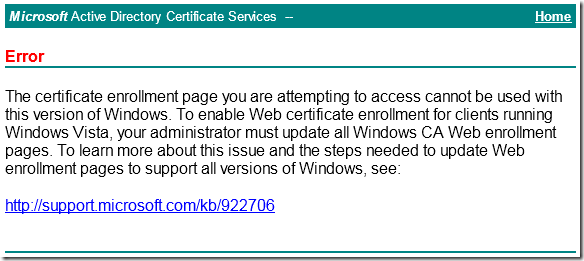
Consider the following scenario. You have Windows Server 2003 with installed Certification Authority and Web Enrollment components. When you try to access web enrollment pages from a Windows Vista-based (or newer) computer you receive a message box:
Read more →
As you may know a DigiNotar CAs was compromised due of some reasons (one, two). Microsoft have decided to break DigiNotar CAs trust at all — http://support.microsoft.com/kb/2607712. Trust breaking is performed as follows:
- DigiNotar CA certificates are removed from Windows Update;
- DigiNotar CA certificates are removed from crypt32.dll on Windows Vista+;
- DigiNotar CA certificates are moved from Trusted Root CAs container to Untrusted Certificates.
Read more →
Today I want to discuss one question about CA certificate validity and how this can be changed.
Issue background
A little abstract. When you install Windows Certification Authority the default value is 5 years. It is quite long period and many young administrators leave default value (especially if they are not very experienced in certificate services). After a time it appears that 5 years is too short validity for CA certificate and administrators lookups for a resolution.
Read more →