



Posts on this page:
- How to convert PEM to PFX in PowerShell (revisited)
- Open Source Day
- Reading multiple signatures from signed file with PowerShell
- Manage pending certificate requests in ADCS with PowerShell
- How to read ADCS Enrollment Agent/Certificate Manager rights in PowerShell
Hello everyone!
Some time ago I wrote a script that converts PEM file to CryptoAPI compatible format: How to convert PEM file to a CryptoAPI compatible format. The script involves some non-PowerShell commands (certutil) which associates private key with a certificate instance. I received several feedback comments about avoiding certutil in favor of native PowerShell/.NET managed code. In this post I want to show some code that eliminates certutil from the script.
Just to recall what we generally do when converting PEM to X509Certificate2/PFX:
- Read the certificate information from PEM file and instantiate a X509Certificate2 object;
- Read PKCS#1 or PKCS#8 private key;
- Convert PKCS#1/PKCS#9 private key to CryptoAPI PRIVATEKEYBLOB;
- Associate PRIVATEKYEBLOB with an X509Certificate2 instance.
Read more →
It was a long-waited decision, however, finally I did it. Today I released my two major .NET projects to GitHub:
- ASN.1 Parser
This is my own ASN.1 binary parser. ASN.1 parser/reader is a mandatory component when you are dealing with cryptography and cryptographic messages, because all they use ASN.1. I’m using this library in ASN.1 Editor and PowerShell PKI module’s API library (it is now opensourced as well).
Read more →
Hello S-1-1-0, it’s time for another blog post. Another PowerShell and CryptoAPI blog post.
Identifying the problem
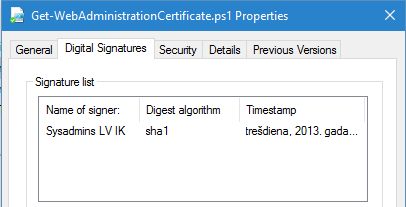
Recently I had a trivial (or non-trivial?) challenge: read multiple signatures from signed files. Usually files have only one signature:
Read more →
I think, I have to publish several articles that would cover common PKI/ADCS administration tasks with PowerShell by using my PowerShell PKI module (of course!). Today I'll cover very simple, but very common task: managing pending certificate requests.
In this post we would propose the following scenario:
- IIS admin requested certificate for internal SharePoint portal
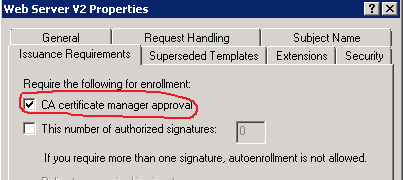
- Certificate template is configured to require CA manager approval to issue the certificate.
- No certificate will be issued until CA manager review and approve the request.
Just to make it clear, CA manager approval is configured in the certificate template, as follows:
you, as CA manager, received notification about incoming certificate request. Your task is to review the certificate request to ensure that it is properly constructed and conforms internal security policies and then make decision: approve or deny certificate request. You can do this by using Certification Authority MMC snap-in, but this would require a lot of clicks and without having a chance to automate this. Another solution that includes PowerShell offers you great automation capabilites.
Read more →
Recently I was asked about how to read Enrollment Agent Rights and Certificate Manager Restrictions in ADCS. At first, I would like to make a little introduction about the subject.
Enrollment Agents
With Active Directory Certificate Services (ADCS) you can designate one or more enrollment agents to enroll on behalf of other users. One of the most common scenarios is smart card provisioning. Suppose, you purchased smart cards and plan to issue them to employees. You will designate one or more highly trusted persons who will:
- instruct employees about smart card usage policies;
- register smart card serial number/other data in the accounting system (some certificate lifecycle management system);
- prepare smart card for use (print labels and so on);
- install certificate for another employee.
Enrollment Agent Restrictions cover the last point in the list. Restrictions define three major parts:
Read more →