



Posts on this page:
- How to programmatically extract CDP, AIA and OCSP URLs from a digital certificate
- Retrieve timestamp attribute from digital signature
- Test remote web server SSL certificate
- Test, whether CA server is online and which interfaces are available
- PS PKI v1.0 is released!
Hi folks! Today I want to demonstrate some useful stuff with CryptoAPI and PowerShell to extract CDP, AIA and OCSP URLs from a digital certificate.
The start point for us is CryptGetObjectUrl function:
BOOL WINAPI CryptGetObjectUrl(
  __in        LPCSTR pszUrlOid,
  __in        LPVOID pvPara,
  __in        DWORD dwFlags,
  __out       PCRYPT_URL_ARRAY pUrlArray,
  __inout     DWORD *pcbUrlArray,
  __out       PCRYPT_URL_INFO pUrlInfo,
  __inout     DWORD *pcbUrlInfo,
  __reserved  LPVOID pvReserved
);
as a pszUrlOid argument we will use the following constants: URL_OID_CERTIFICATE_ISSUER (from AIA extension) and URL_OID_CERTIFICATE_OCSP_AND_CRL_DIST_POINT. Constant values (as per Wincrypt.h) are:
Read more →
One friend of mine asked about how to get signature creation time in PowerShell. When we sign a file, optionally (but recommended) we can timestamp the signature, thus approving that the file was signed at the certain moment and wasn't re-signed later. Some useful details about signatures and timestamps you can read in my previous article: Digital signatures.
Here is what we see in the UI:
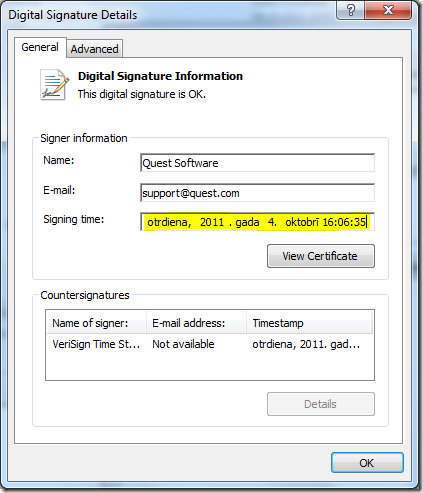
We see the following fields:
Read more →
A time ago, Windows PKI team posted an article about a tool that allows you to check web server SSL certificate: Verifying The SSL Certificate Expiration with a tool. Unfortunately, the download link is broken. I have this tool and uploaded it to my weblog: VerifySSLCertificate.
- ZIP archive SHA1 hash: C633A3DC3E8A3AA6BDD714EABB925429076A160A
- Executable SHA1 hash: A13CE031F5C1331785E87B62D1464C6260549EC0
The tool is very good, but what if you want to run the test against a bulk of servers? Any sort of automation and batching means some PowerShell stuff :). To provide administrators with such tool I wrote a PowerShell script, where you can test web server SSL certificate and it's status. You can export required fields to XML or CSV for future examination/audit. Let's go:
Read more →
At first, I want to mention that you can use the following CMD commands:
- certutil –ping
Pings certificate management (ICertAdmin) and enrollment (ICertRequest) interfaces. Optionally you can ping remote CA interfaces: certutil –config CAHostName\CAName –ping
What if you want to do this programmatically? Nice question! Looking to CryptoAPI reference you can find the following methods: ICertAdminD::Ping and ICertRequestD::Ping methods. However, local COM interfaces does not support these methods. Workarounds? PowerShell has workaround! Here is a simple code example, that tests CA and interface availability:
Read more →
Hello мир! Yesterdays I've published another version of my PowerShell PKI module — v1.0. Here are release notes:
Installation experience
I've spent much time on reviewing existing installation experience. My main goals were:
- Provide a single package for different platforms — x86 and x64.
- Support direct updates (without requiring to manually remove previous installation).
- Provide custom installation scenarios — for current user or for all users.
As you may be noticed, previously I've used Advanced Installer (thanks to PowerShell MVP Shay Levy who advised me this product) to wrap my package in MSI. Advanced Installer has intuitive, well-designed (attractive) and rich UI and this product is (possible) the best for beginners like me. However, free license is not enough for custom installation scenarios (like 32/64-bit mixed packages, direct upgrades, patching and so on). In order to accomplish these goals, I've contacted Caphyon Advanced Installer team for some support here. Advanced Installer support was very quick and kind, so I'm ready to provide new installation experience.
Read more →