



Hello everyone, I was silent for some time and today I'm back with some news.
It's official: AD CS ain't dead! On May 12, Active Directory Certificate Services (AD CS) got first PQC algorithm support, three flavors of ML-DSA:
- ML-DSA-44 (10,496 bits)
- ML-DSA-65 (15,616 bits)
- ML-DSA-87 (20,736 bits)
In fact, PQC already was in BCrypt/NCrypt for some time, just not fully exposed through CNG, so you didn't see it in cryptographic provider properties.
PQC support in AD CS is added only to Windows Server 2025, starting with 2026.05B update (KB 5087539). As far as I know, there are no plans to update CertOCM (Certificate Object Component Manager, or simply AD CS installer) for previous Windows Server, such as 2019 and 2022.
In this post, I'm not going to talk about PQC specifics in this post (I hope next time), I'll just focus on what new we will find in AD CS, certificate templates, certificate enrollment.
Updated AD CS install Dialog in Server Manager
Note: I will skip common Server Manager wizard dialogs.
When installing CA and selecting to generate a new key pair, we can see new entries in the algorithm drop-down list:
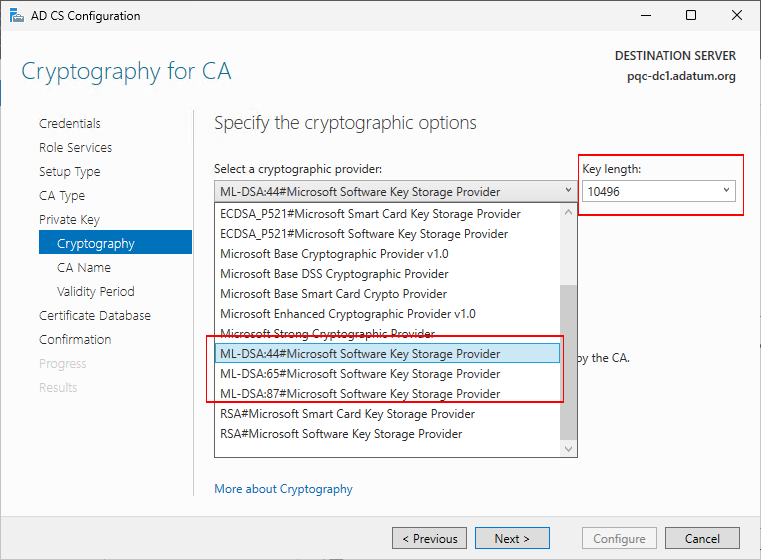
Also, notice that when you select any of ML-DSA algorithm, the list of hash algorithms is changed to only one entry, called "No Hash":
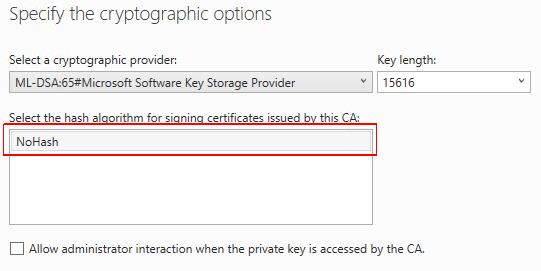
There is no SHA1, SHA256, or whatever. This is one of the properties of ML-DSA — hash algorithm is part of signature scheme. Previously with RSA/DSA/ECDSA, you calculated the hash first and then signed it with private key. This would give you some felxibility, today you sign SHA1, tomorrow MD5, then SHA512. In ML-DSA, hashing algorithm and function is tightly coupled with signature scheme. NoHash doesn't mean ML-DSA doesn't hash the data — it does, but do not provide you a way to configure hashing algorithm, it's already preconfigured for you.
When installing using PowerShell ADCSDeployment module, Install-AdcsCertificationAuthority cmdlet, the installation flow is not much different:
Install-WindowsFeature ADCS-Cert-Authority -IncludeManagementTools
Install-AdcsCertificationAuthority `
    -CACommonName "Adatum PQC Root CA" `
    -CADistinguishedNameSuffix "OU=Division of IT (DoIT),O=Adatum, C=LV" `
    -CryptoProviderName "ML-DSA:65#Microsoft Software Key Storage Provider" `
    -HashAlgorithmName "NoHash" `
    -ValidityPeriodUnits 15 `
    -CAType StandaloneRootCA
Except: you have to explicitly specify -HashAlgorithmName "NoHash" if you select ML-DSA public key. The reason is that CertOCM default properties (PowerShell cmdlet is just a wrapper around CertOCM) are initialized to RSA/SHA256. When you change public key algorithm, hash algorithm is not flipped.
The rest of dialogs are unchanged, and can proceed with Next → Next → Finish.
After installing the CA, in Certification Authority MMC snap-in (certsrv.msc), we can see properties:
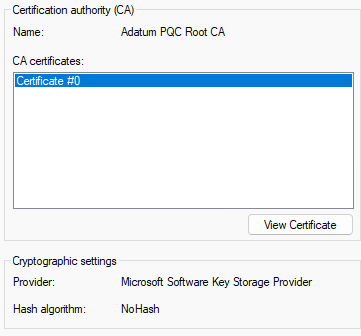
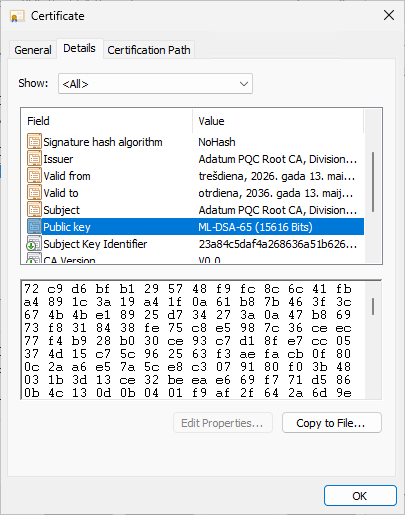
Under cryptographic settings, Microsoft Software KSP and NoHash, all as expected and the certificate itself:
Updated Certificate Templates
Certificate Templates UI also includes ML-DSA algorithms in Cryptography tab:
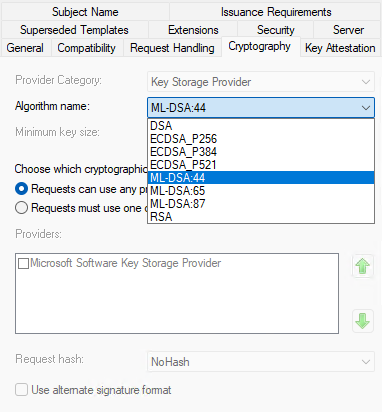
Also notice that hashing and alternate signature format controls are disabled once you select ML-DSA. Alternate signature algorithm (aka PKCS#1 v2.1) is not supported, because signature scheme is tied to particular ML-DSA algorithm.
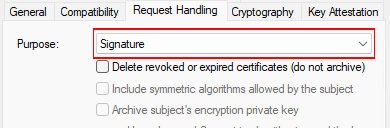
Sometimes you may find that ML-DSA is not listed in the template cryptography settings. In order to have them listed, template purpose in Request Handling tab, MUST be set exactly to Signature:
Certificate Enrollment Wizard
You can use Windows 11 25H2 to enroll ML-DSA certificates from modern AD CS:
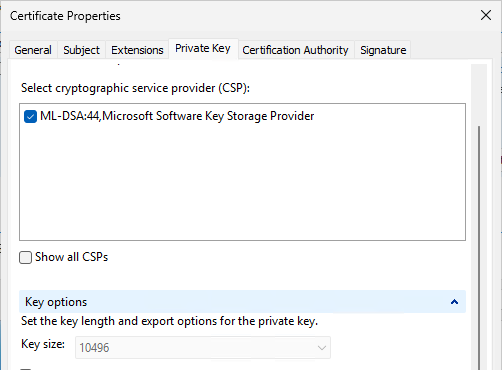
For an outdated Windows 11 client, you may see ML-DSA algorithm available, but enrollment fails. This means that ML-DSA is only partially enabled in KSP. Look at Key size field. If it is set to 0, then you need to apply latest windows updates. If it shows some meaningful key size, you are fine.
Here is the issued certificate:
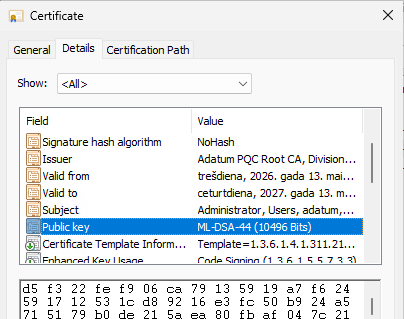
Nothing special, just some code signing certificate
Online Responder (OCSP Server)
You can update OCSP Response Signing template (or better, create a custom one based on default template) to use ML-DSA and OCSP will be more than happy with ML-DSA certificate. For RSA and ECDSA, Online Responder allowed to select hashing algorithm for OCSP signatures. As we already learned, this is not the case with ML-DSA:
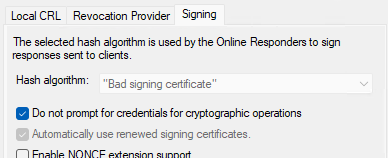
Hash algorithm is as expected: "Bad signing certificate" :)
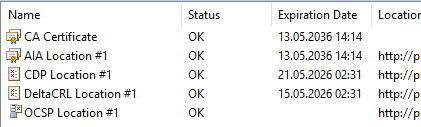
But PKI View (pkiview.msc) says that I'm fine:
Code Signing
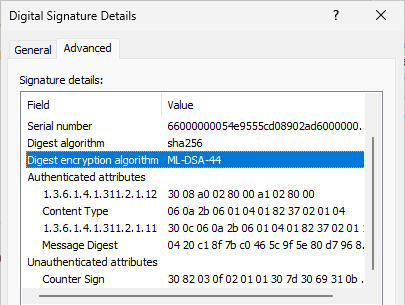
I quickly tested with PowerShell Get-AuthenticodeSignature and Set-AuthenticodeSignature cmdlets, including signature UI, MSL-DSA signatures work just fine:
.NET
ML-DSA is available in .NET (on Windows platform) since its support was added into BCrypt/NCrypt subsystem and is provided in a form of MLDsa class (with MLDsaCng implementation for Windows).
Not yet supported
After quick testing, I found that PQC certificate binding doesn't work yet in:
- IIS HTTPS binding
- Kerberos Authentication
- Data encryption (EFS, Secure Email, etc.)
Summary
In this post, I briefly outlined the first major PQC upgrade in Windows in a form of upgraded AD CS. This is not an exhaustive research, but something useful to begin with. Many people said that "AD CS" is dead, not updated, but it is still a tool #1 in Microsoft ecosystem, but we see it's not dead. Funny thing, with the Client Authentication EKU deprecation for public CAs, many mTLS scenarios will have to search for private CA alternatives. And AD CS is a great candidate for this role with modern cryptography support. In next post, I will try to tell some another story, stay tuned!

Hi Vadims. Thanks for the article and your valuable thoughts, as always.
I'm in the process of setting up a PoC PQC CA in our company's infrastructure and have to choose between one of the ML-DSA algorithms (44/65/87).
Is there any generalistic "best practice" to follow at the moment? Otherwise, I guess it comes down to use-cases and future-proofness?

Hi vadims, great article. What if i want my new ML-DSA private key to be created on an HSM?
The Thales HSM documentation mentions you must choose a Safenet Cryptographic provider. There does not seem to be one for the ML-DSA, i know this is really a question for them. I am asking them but wondered if you had any experience using an HSM and ML-DSA cryptographic provider?
Post your comment:
Comments: