



Hello world! Recently, a fellow guy asked a question: why freshly registered OID is not visible in his app, while other applications see that OID. Today I will explain some nuiances on how AD-registered OIDs are propagated to clients and how OID caching works.
The OID metabase
Every Windows installation ships OID (Object Identifier) mapping table, which divides various OIDs into a fixed set of OID groups:
| Group ID | Group Name | Description |
|---|---|---|
| 1 | HashAlgorithm | Contains hash algorithms, such as md2, md4, md5, SHA1, SHA256, SHA384, SHA512 and so on. |
| 2 | EncryptionAlgorithm | Contains symmetric encryption algorithms such as DES, 3DES, AES128, AES256 and so on. |
| 3 | PublicKeyAlgorithm | Contains public key algorithms, such as RSA, DSA, ECC, ECC curves, ML-DSA, ML-KEM and so on. |
| 4 | SignatureAlgorithm | Contains composite signature algorithms, such as sha1RSA, sha384ECDSA, ML-DSA-44, and so on. |
| 5 | Attribute | Contains X.520 RDN attributes, such as CN, E, C, Street, DC and so on. |
| 6 | ExtensionOrAttribute | Contains X.509 extension OIDs and CMS/PKCS#9 attributes, such as "Message Digest". |
| 7 | EnhancedKeyUsage | Self-explanatory, EKUs, such as "Server Authentication", "Code Signing" and so on. |
| 8 | Policy | Contains certificate policy OIDs, see RFC 5280 §4.2.1.4. Example: "All Issuance Policies" |
| 9 | Template | Contains ADCS certificate template OIDs. |
| 10 | KeyDerivationFunction | Contains KDF OIDs, such as ECDH_STD_SHA1_KDF |
Any OID in the table consist of four parts:
- OID group;
- OID Value (decimal-dot form);
- FriendlyName.
- Flags (not exposed by public APIs, but each OID has a flag with the information about source registration)
There is no easy way to explicitly enumerate this mapping table (or database), but you can use Win32 functions to:
- Translate (resolve) an OID to a friendly name (Get-ObjectIdentifier or Get-ObjectIdentifierEx cmdlet in PSPKI module);
- Translate (resolve) Friendly Name to an OID (Get-ObjectIdentifier or Get-ObjectIdentifierEx cmdlet in PSPKI module);
- Register an OID locally (Register-ObjectIdentifier cmdlet in PSPKI module);
- Unregister OID from local system (Unregister-ObjectIdentifier cmdlet in PSPKI module);
- Other functions.
Write functions require local administrator permissions.
Alternatively, you can use PowerShell to make resolution using Oid .NET class:
PS C:\> [System.Security.Cryptography.Oid]::new("sha1")

Value         FriendlyName
-----         ------------
1.3.14.3.2.26 sha1


PS C:\> [System.Security.Cryptography.Oid]::new("2.16.840.1.101.3.4.2.1")

Value                  FriendlyName
-----                  ------------
2.16.840.1.101.3.4.2.1 sha256


PS C:\>
It works both ways. If OID is not known, then a new instance of the object is returned with search qualifier placed in Value property:
PS C:\> [System.Security.Cryptography.Oid]::new("powershell")

Value      FriendlyName
-----      ------------
powershell


PS C:\>
It is important to understand that single OID can be registered multiple times in same or different groups. For example, SHA256 (2.16.840.1.101.3.4.2.1) is registered in two, HashAlgorithm and SignatureAlgorithm group. Wonder why? Give it a shot:
PS C:\> [System.Security.Cryptography.Oid]::FromOidValue("2.16.840.1.101.3.4.2.1", 1)

Value                  FriendlyName
-----                  ------------
2.16.840.1.101.3.4.2.1 sha256


PS C:\> [System.Security.Cryptography.Oid]::FromOidValue("2.16.840.1.101.3.4.2.1", 4)

Value                  FriendlyName
-----                  ------------
2.16.840.1.101.3.4.2.1 sha256NoSign


PS C:\>
Hash algorithms are used for null-signed signatures, so Microsoft took care of this and registered twice. Also, One OID can be registered multiple times in same group with different aliases. For example, E and Email, both map to 1.2.840.113549.1.9.1 value in Attribute group.
Active Directory OID database
Active Directory also can act as an OID metabase source and is located at: CN=OID, CN=Public Key Services, CN=Services, {ConfigurationNamingContext}:
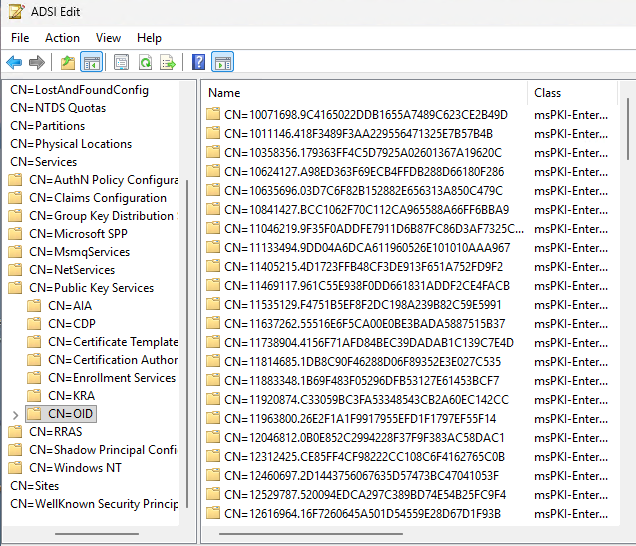
Every entry (which has a bit weird name, but it has a logic, which I will explain later) contains OID value (ms-PKI-Cert-Template-OID attribute), group (flags attribute) and sometimes friendly name (displayName attribute):
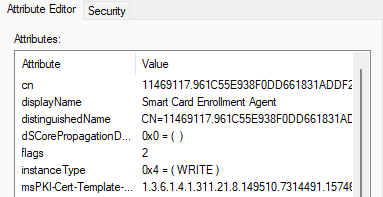
Note that many entries will not have displayName attribute populated, most likely they are orphanned. Active Directory supports only three OID groups which is identified by a flags attribute:
- 1 — Certificate Template
- 2 — Issuance (certificate) policy
- 3 — Application (EKU) policy
Other OID groups are not supported by AD. When you create a certificate template, EKU or issuance policy, a new OID is registered in this containter.
AD OID propagation
All AD OIDs are propagated to all forest machines during autoenrollment trigger, or group policy refresh (which may take up to 8 hours). You can force autoenrollment trigger by calling certutil -pulse command in elevated Terminal app. During autoenrollment trigger, autoenrollment client will fetch a bunch of PKI-related stuff, such as Root CA certificates, intermediate, cross-certs, etc. And OIDs are part of this fetch process. Autoenrollment client (in the context of local system) will register AD OIDs into local metabase. Once AD OIDs are copied to local metabase, AD OIDs can be quickly resolved without AD connection, because OID Support Functions do not make AD queries.
When OID is deleted from AD, then autoenrollment does two-way check against local metabase and delete AD-registered from local metabase.
Caching
And here we approach the original question, why some apps do not see or resolve OIDs from AD?
OID metabase snapshot is loaded into application process. And this snapshot is not updated during the process lifetime. If you registered new OID, even inside the process, system API (including .NET, which is a wrapper around system API here) will NOT see these changes until the process is restarted.
Non-Trivia
As promised, I will provide an explanation about why PKI OID entries are named so weirdly in Active Directory. I saw many horrible implementations of "fancy scripted certificate template editor" which generated entries in OID container with absolutely random names (such as Guid, why not) without real understanding how they are named and why they are named this way. OID entry names are derived from OID value. By having only OID value alone, you can deterministically produce exact OID entry name and here is the template:
{Last Arc of an OID}.{MD5 hash over entire OID string as ASCII characters}
The reason is simple: every time you duplicate a template, a temporary OID is registered in OID container. When you close template duplication dialog, temporary OID entry is deleted (yes, when you duplicate a template, OID is registered twice, first temporarily and then permanently on save). When you delete the template, its OID is deleted. When you delete custom Application or Issuance policy, a matching entry is deleted from OID container. Instead of enumerating all entried in OID container, Certificate Template MMC deterministically calculates entry name and delete it in one simple LDAP query. If you use random names, or Guid, then OID deletion logic will fail to delete corresponding OID and your AD will be cluttered with orphaned OID entries.
Post your comment:
Comments: