



Posts on this page:
- How to convert pKIExirationPeriod and pKIOverlapPeriod Active Directory attributes
- PS PKI v1.8 is released!
- Windows Server 2012 RC, Active Directory Certificate Services features
- How to retrieve certificate purposes property with CryptoAPI and PowerShell
- You cannot submit a certificate request generated by Exchange Management Console (EMC) or Exchange Management Shell (EMS) to Microsoft Certificate Ser
Hi, PowerShell CryptoGuy is here again.
I'm intensively working on the PowerShell PKI Module development and functionality expansion and I want to talk about recent issue. In next version Get-CertificateTemplate will expose template settings which you can look in Certificate Templates MMC snap-in UI. This includes certificate validity, renewal periods, key generation options, issuance requirements, extensions and so on. In other words, everything else that may have sense for PKI administrators.
While almost everything was very easy to implement, I was struggled with pKIExpirationPeriod and pKIOverlapPeriod attributes in Active Directory. The problem is that documentation states that the value is FILETIME structure. And this structure values starts with 1601 year. FILETIME structure can be transformed to a single long (as type) integer rather than as 2 unsigned integers. I've done the same trick previously in this article: How to convert ms-PKI-Roaming-TimeStamp attribute. However this trick won't work in this case. Some investigations. The following value we can see for default Web Server template in ADSIEdit.msc:
Read more →
Hi S-1-1-0! Today I've released a new version of my PowerShell PKI module.
New commands
Unlike previous versions, this version do not introduce any new commands.
Existing code changes
Instead, I take a time to make the module more consistent. As a part of this work I revisited all help topics. Now all help content is more accurate and consistent. Also I've added additional examples (where I considered this as important) and clarified existing parts.
After discussions with Windows PKI team, I was forced to change the things in Add-ExtensionList and Remove-ExtensionList. CAExtension and UserExtension parameters were renamed to EnabledExtension and OfflineExtension respectively. Parameter descriptions can be found in built-in and online help topics. ExtensionList object properties are renamed accordingly to make them consistent with parameters.
Read more →
A little note about features in Windows Server 2012 AD CS. Only three major improvements are available:
- All Windows Server 2012 SKUs supports all AD CS features.
From version to version, Microsoft introduces new features in AD CS, however not all are available in all SKUs. For example, in Windows Server 2008 an Online Responder service was added, but was available on Enterprise and Datacenter SKUs. The same thing as with Cross-forest certificate enrollment in Windows Server 2008 R2. Only Enterprise and Datacenter SKUs supported these features. From now, Windows Server 2012 Standard Edition will support *all* features in AD CS. This means that the following roles are available to any who has Windows Server 2012:
Read more →
Hello crypto world! One my colleague asked me about how to get certificate purposes property. Here is a little intro.
Certificate purposes are (mainly) limited by Enhanced Key Usages extension:
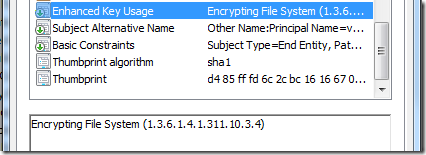
That is true. In certain cases it is reasonable to limit certificate purposes to a subset of purposes that are allowed in EKU extension. For example, in many and many CAs are allowed for any purpose (All Application Policies) and you can limit it's purposes to a limited set:
Read more →
SYMPTOMS
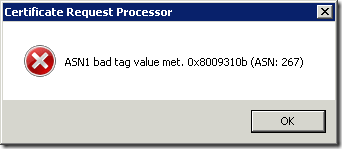
Consider the following scenario. You create certificate certificate by using either Exchange Management Console (EMC) or Exchange Management Shell (EMS) and save it to a file. When you attempt to submit certificate request to a Windows-based Certification Authority (CA) (also known as Microsoft Certificate Services), you may receive error message. If CA server runs on Windows Server 2003 (R2) or Windows Server 2008, you receive the following message:
Read more →