



Posts on this page:
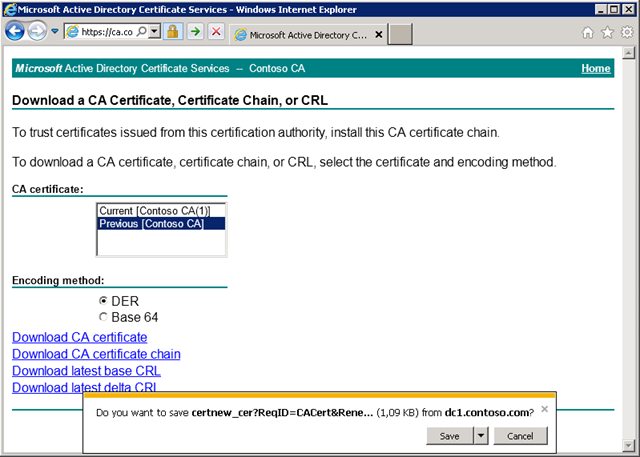
- You cannot download CA certificate from web enrollment pages
- Automate archived key migration to a new CA server
- Root Certification Authority (CA) CDP and AIA extension question
- How to convert ms-PKI-Roaming-TimeStamp attribute
- MS Certificate Services virtualization issues
SYMPTOMS
When you try to download CA certificate from web enrollment pages you get a prompt message with unreadable proposed file name:
Do you want to save certnew_cer?ReqID=CACert&Renewal=1&Enc=bin (1,09 KB) from <ServerName>
Read more →
Some time ago one guy asked me for a script that will do the following:
- Extracts all archived keys from CA database;
- decrypts these keys (by using key recovery agent certificate)
- saves decrypted keys in a PFX (PKCS#12) format;
- creates simple log files: one with serial numbers that were decrypted successfully and another were decryption process was unsuccessful.
This scenario is common when an organization decided to move to a new PKI with new CA database. However it is highly recommended to move archived private keys from old to a new CA server. This is because even if new PKI is used, there might be a lot of encrypted stuff (encrypted files or outlook mails). And if user looses his/her encryption private keys he/she still should have an access to encrypted content. As the result you should move archived keys to a new CA for key recovery purposes only.
Read more →
Time by time I read questions about CDP and AIA extensions on Root CA and in Root CA certificate.
- CDP — CRL Distribution Point is an extension that contains links to the CRL of the issuer of the certificate which is being verified.
- AIA — Authority Information Access is an extension that contains links to the certificate of the issuer of the certificate which is being verified.
Check these articles for better understanding of certificate chaining engine:
- Certificate Chaining Engine — how it works
- Designing CRL Distribution Points and Authority Information Access locations
Let's see how these are used by certificate chaining engine (CCE). At first application must build a certificate chain. When CCE is processing a certificate it uses AIA extension to retrieve certificate issuer's certificate. Once it is retrieved, CCE set issuer's certificate as current and checks for *current* certificate issuer's certificate. This is normal and expected behavior for non-self-signed certificates. Once a certificate is presented in the self-signed form, there is no issuer. Certificate is issued to itself. As the result if AIA extension exist in the self-signed certificate it will point to itself and will cause loops. To address this issue, it is recommended to *NOT INCLUDE* AIA extension in the self-signed certificate (also referred to Root certificate).
Read more →
Windows PKI team always knows how to make our live harder :). Yesterday Shay Levy pointed me to one interesting thread: http://www.powergui.org/thread.jspa?messageID=47514
Basic intro: this attribute is used by Credential Roaming Service. By default if user uses roaming profile, credentials (and personal certificates) don’t roam! This means that user can use the same profile on other computers, but will not able to use certificates (i.e. decrypt files, mails, sign documents and so on). Though if certificate autoenrollment is enabled, user will enroll new certificates. But they will remain on that computer only. The one possible way to work around this issue is to use smart cards. But this is quite expensive solution. With Credential Roaming Service all certificates will roam with user. However this is not pretty secure solution, because domain administrators will have an access to user private keys. However at certain point domain users must trust administrators, so this solution is enough for many scenarios with roaming profiles.
Read more →
Several days ago I have worked on one interesting issue:
Enterprise CA running on a Hyper-V virtual machine. Due of maintenance plans host server was rebooted. In the next day users were unable to logon to their workstations by using smart cards due of the error: A revocation check could not be performed for the certificate. Password users were unable to connect to terminal servers by using RDP-TLS protocol due of the same error.
Read more →